Fleet work OS · Windows shipped · active development

Organize your crew—not just another shell window.

Everything on your machine, under your control.

The verifiable fleet OS for local processes and agents. A team tree on the left, the terminal as viewport, and an external Composer for real input—built for programmers and sysadmins first; scripts and agents share the same durable control plane.

Portable build · unzip and run · detach close keeps your fleet alive

Portable dist 4 MiB GUI budget Headless server authority tmux/RMUX subset via mux

Core invariants

Exit ≠ erase

A dead process keeps its final screen in a readable tab until you explicitly close it.
Close ≠ kill

Detach-first window close hides the GUI but preserves the live server, tabs, and PTYs.

Verify ≠ sleep

Automation waits on snapshots, events, and receipts—not arbitrary timers.

Three surfaces. One fleet.

Daily work stays quiet; organization, observation, and intervention stay explicit.

ORG · TREE

Organize the crew

Hierarchical tabs with names, notes, and stable @ids—agents, shells, and long-running jobs in one map.

OBS · VIEWPORT

Observe truth

Native terminal scrollback, status context, structured snapshots, and an event journal you can wait on.

INT · COMPOSER

Intervene outside the stream

Every tab owns a multiline Composer—prepare commands and prompts without fighting live output.

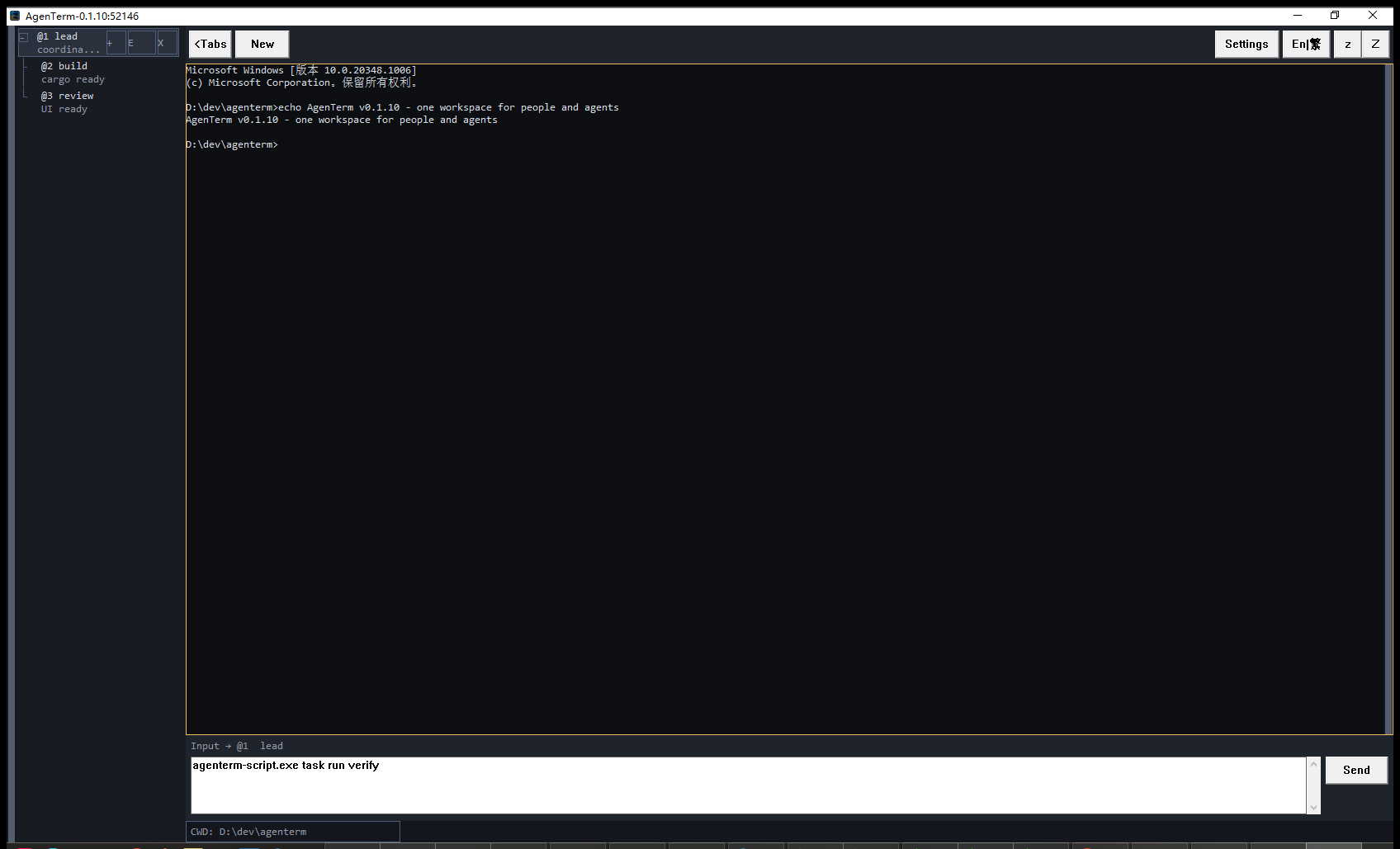
AgenTerm showing a hierarchical agent tab tree with notes, terminal toolbar, per-tab composer, and terminal status bar
AgenTerm: a compact scrollable team tree at left, terminal toolbar and viewport in the workbench, the selected tab's composer below, and terminal-scoped status at the bottom.

One afternoon, one map.

How it feels when parallel work stops fighting you.

01 · SEE

Reviewer agent, build, and logs live in one tree—not twenty floating windows. You see who is alive, who finished, who failed.

02 · PREPARE

You write the next command in Composer while output keeps streaming. Long prompts and runbook steps stay editable before Send.

03 · PROVE

Close the window to clear your desktop—the fleet keeps running. Your script waits on output and saves a screenshot as proof, not a guess.

A fleet that stays understandable.

AgenTerm keeps its daily interface quiet while making process lifecycle, hierarchy, input, and state explicit.

01 / DURABLE OUTPUT

Exited does not mean erased

An exited process leaves its final screen and exit code in a readable tab. The tab closes only when you explicitly close it.

02 / TEAM TREE

Hierarchical tabs

Organize agents and programs as a visible parent/child tree. Closing a parent promotes its direct children instead of terminating them.

03 / COMPOSER

Input per workspace

Every tab owns an independent multiline draft and Send action, keeping prepared instructions attached to the right terminal.

04 / RESTORE

Workspace continuity

Normal restarts preserve the tab tree, names, notes, drafts, commands, and active tab. Commands restart honestly as new processes.

05 / TERMINAL

Native, practical interaction

Win32/GDI rendering, ConPTY processes, scrollback, a draggable scrollbar, terminal selection, clipboard copy and bounded paste are built in.

06 / DETACH

Close window, keep the fleet

Detach-first close hides the GUI while the headless server, live PTYs, scrollback, and drafts keep running.

One product. Many daily workflows.

Same fleet OS for the people who juggle parallel work on one machine.

Developers Feature crews, reviewer agents, builds, and capture-to-verify loops.
Sysadmins Service trees, log tabs, runbooks in Composer, headless server + mux.
Creators Draft, render, and publish pipelines with long-form Composer input.
Office workers Today’s task tree, report drafts, and helpers—without losing context when something stops.

Public control plane

Observe, act, then verify.

agenterm-cli.exe exposes the same fleet through typed loopback IPC. Stable tab IDs, structured snapshots, event positions, deterministic waits, and PNG evidence make automation inspectable.

  • Create, select, rename, nest, capture, and drive tabs
  • Wait for output or UI state without fixed sleeps
  • Target an explicit local AgenTerm server
  • Use a documented single-pane tmux/RMUX subset through agenterm-mux.exe
  • Inspect the native adapter and typed platform capability status through protocol-info
PS> .\agenterm-cli.exe list-tab-tree
PS> .\agenterm-cli.exe new-agent -n reviewer
PS> .\agenterm-cli.exe wait-pane `
      -t @2 --contains "Finished" --timeout-ms 30000
PS> .\agenterm-cli.exe screenshot-pane `
      -t @2 -o reviewer.png

# Discover the live contract
PS> .\agenterm-cli.exe list-commands
PS> .\agenterm-cli.exe protocol-info
PS> .\agenterm-cli.exe ui-snapshot

Not another tabbed terminal.

Tabby, ConEmu, Warp, and OS terminals optimize single sessions or chat-in-buffer. AgenTerm optimizes fleet durability and verifiable control.

Typical terminals

  • Flat tabs; context vanishes when a process exits
  • Typing competes with streaming output
  • Scripts sleep and guess instead of waiting on state
  • Close the window, lose the session

AgenTerm

  • Team tree for agents, shells, and long-lived jobs
  • External Composer per tab for real editing
  • CLI, script, mux, MCP on one typed contract
  • Detach-first close; headless server keeps running

One authority. Several clients.

agenterm-server owns the fleet; everything else observes and acts through the same public contract.

agenterm-server  tree · PTY · journal · persistence · no HWND
    ↑ typed IPC · snapshots · waits · receipts
clients        agenterm (GUI) · agenterm-cc (Control Center) · agenterm-cli · agenterm-mux · agenterm-script · agenterm-mcp
promise        unsupported ops fail explicitly — no false success
Lightweight native core

Portable Windows builds with strict binary budgets. Network, marketplace, and heavy runtimes stay optional sidecars—not GUI bloat.

Windows shipped, core expanding

Windows is the shipped surface today. Linux and macOS share protocol, clients, and terminal kernel while native GUI delivery progresses.

Active development, honest scope

Shipped, partial, and planned capability are labeled in the product tree. Inspiration and roadmap items are not release promises until promoted.